If you're in the custom apparel business, you know that time is money. Every minute spent cutting, weeding, and aligning transfers eats into your profit margin. That's where the DTF Gangsheet comes in. By arranging multiple designs on a single sheet, you can print, press, and ship faster than ever. In this article, we'll explore how DTF gangsheets work, why they're a game-changer for efficiency, and how to use them to cut costs without sacrificing quality.
What Is a DTF Gangsheet?
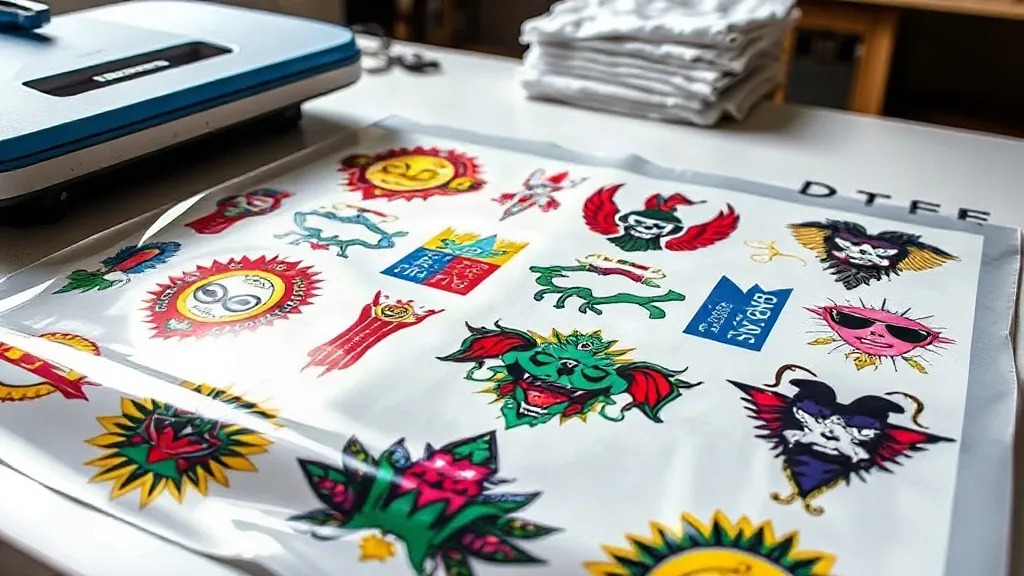
A DTF (Direct to Film) gangsheet is a single film sheet that contains multiple printed designs, typically arranged to maximize space. Instead of printing each design individually, you gang them up, hence the name. This method is popular in the DTF printing community because it saves time, reduces material waste, and lowers production costs.
DTF printing itself involves printing your artwork onto a special film, applying a powder adhesive, and then heat-pressing the film onto fabric. The gangsheet approach takes this a step further by allowing you to print several designs in one go. Whether you're producing a batch of t-shirts for a local team or fulfilling an order for a corporate client, gangsheets can significantly speed up your workflow.
Why Use a DTF Gangsheet?
The benefits of using a gangsheet are numerous, but they all boil down to efficiency and cost savings. Let's break down the main advantages.
Time Savings
Printing each design separately means multiple passes through the printer, more cutting, and more pressing. With a gangsheet, you print all designs at once, cut them out, and press them in quick succession. This is especially beneficial for small to medium-sized orders where the setup time can eat into your profits.
Cost Efficiency
DTF film and powder are consumables that add up quickly. By maximizing the use of each sheet, you reduce waste and get more out of your materials. Additionally, gangsheets often qualify for bulk pricing from suppliers, further lowering your per-unit cost.
Consistency and Quality
When you print multiple designs on the same sheet, they all go through the same printing and curing process. This consistency ensures that every transfer has the same vibrant colors and durability. Plus, you can inspect the entire sheet at once, catching any issues before they reach the press.
How to Create a DTF Gangsheet
Creating a gangsheet is straightforward, but it requires some planning to get the most out of your film. Here's a step-by-step guide.
1. Choose Your Designs
Select the designs you need to print. Consider the size of each design and how they can be arranged to minimize empty space. If you're printing for multiple orders, group designs by similar colors or themes to streamline the process.
2. Use Gangsheet Software or Templates
Many DTF printing software programs offer gangsheet templates or automatic nesting features. These tools help you arrange designs efficiently, ensuring you use as much of the film as possible. Alternatively, you can manually arrange designs in a graphic design program like Adobe Illustrator or Photoshop.
3. Print and Cure
Once your gangsheet is ready, print it using your DTF printer, apply the adhesive powder, and cure it according to your printer's specifications. Make sure to follow the recommended settings for your film and powder to ensure proper adhesion and durability.
4. Cut and Press
After curing, cut out each design, leaving a small border to prevent ink from bleeding during pressing. Then, heat-press each design onto your garment using a heat press. The temperature and time will depend on your transfer and fabric, but typically it's around 300°F for 10-15 seconds.
Tips for Maximizing Efficiency with Gangsheets
To truly reap the benefits of gangsheets, consider these practical tips.
- Plan ahead: Group designs that are similar in size and color to reduce film waste and printing time.
- Use nesting software: Invest in software that automatically arranges designs to minimize gaps.
- Standardize sizes: If possible, standardize the sizes of your designs so they fit neatly into a grid, making cutting easier.
- Keep a template library: Save commonly used layouts as templates to speed up future gangsheet creation.
- Test and refine: Keep track of your film usage and adjust your layouts to improve efficiency over time.
Common Mistakes to Avoid
Even experienced printers can run into issues with gangsheets. Here are a few pitfalls to watch out for.
- Overcrowding: Packing too many designs without enough spacing can cause ink to bleed or transfers to overlap during pressing.
- Ignoring fabric types: Different fabrics may require different pressing parameters. Make sure to adjust your settings accordingly.
- Forgetting to mirror: DTF transfers are typically pressed face down, so designs must be mirrored before printing. Double-check your artwork orientation.
- Skipping quality checks: Always inspect the printed sheet for defects before cutting and pressing. Catching issues early saves time and materials.
Frequently Asked Questions
What is the maximum size for a DTF gangsheet?
The maximum size depends on your printer's capabilities. Common widths are 13 inches, 17 inches, and 24 inches, with lengths limited by your film roll. Some printers can handle rolls up to 100 meters long, allowing for very large gangsheets.
Can I mix different designs on one gangsheet?
Absolutely. That's the whole point of a gangsheet. You can mix any designs as long as they fit within the printable area. Just ensure that each design has enough space around it for cutting and pressing.
How do I ensure my gangsheet prints don't smudge or fade?
Use high-quality DTF film and powder, and follow the recommended curing and pressing settings. Also, store your transfers in a cool, dry place away from direct sunlight to prevent degradation.
Do I need special software to create a gangsheet?
Not necessarily, but gangsheet software can save you time by automatically arranging designs. If you're handy with design software, you can manually create a gangsheet layout.
Is a DTF gangsheet cost-effective for small orders?
Yes, even for small orders, gangsheets can be cost-effective because they reduce waste and save time. However, the benefits are more pronounced for larger orders where the savings multiply.
By incorporating DTF gangsheets into your workflow, you can streamline production, reduce costs, and deliver high-quality custom apparel faster. Give it a try and see the difference it makes in your shop.